
- Screaming Frog’s free tier can only crawl a maximum of 500 URLs, blocks sitemap parsing and robots.txt configuration, which is limiting for pre-launch audits.
- A lightweight Python script built with Claude handles the basics at no cost: URLs, status codes, title tags, meta descriptions, H1s and word counts.
- Feeding the CSV output to Claude gives you a prioritised fix list, not just raw data.
After I built my site, I immediately wanted to audit it and running Screaming Frog (free tier) was my first step. Now I haven’t used the free tier for a very long time, but to my utter disappointment I found it very limiting.
So I built a tool that bypasses some of those limitations – and at no cost to you.
What’s wrong with Screaming Frog’s free tier?
Normally SEOs would point to the 500 URL limit as the biggest obstacle but my site is new and tiny so I wasn’t being throttled here. For larger sites this limit is enough to feel useful, but not enough to actually finish a job.
The issue I ran into immediately was that I had no configuration access which means I couldn’t do basics like:
- Add a XML sitemap to make sure all core URLs will be crawled
- Ignore robots.txt as the site was set to not be discoverable yet
At $279 / year (the minimum tier), Screaming Frog was a serious commitment for a pre-launch site or a one-off audit. Claude Code was my other obvious alternative but it has its own setup overhead (especially if you want to go deeper).
What do you actually need instead?
So what I needed was an alternative option that would not cost me anything extra. Note that at this stage I had an active Claude Pro subscription (and a completed Claude Code setup where I could make direct changes to my site) – but I wanted to provide a solution that could be done with a free Claude account.
So what would the absolute basics be to get me up and running?
- A computer (a Mac also counts. Barely),
- Python (free)
- A text editor to save the script (even Notepad works)
- A Claude account (free tier sufficient)
No AI platform costs (a paid Claude account would help but not block progress), no Screaming Frog licence and no Claude Code setup.
For this experiment I wanted the script to handle:
- Crawling all URLs
- Parsing the sitemap
- Ignore robots.txt
- Pull title tags, meta descriptions, H1s, status codes, canonical tags
- Provide a word count
How do you build the crawler?
This prompt was created in collaboration with Claude – I listed my requirements, asked for feedback and if there was anything else to consider.
I need a Python script that crawls a website for an SEO audit. Here's what it needs to do:

Crawl all URLs on the site starting from a given base URL. Also parse the sitemap at /sitemap.xml if one exists, and add any URLs found there to the crawl queue.

For each URL, collect: the URL itself, HTTP status code, page title, meta description, H1 tag (first one found), whether there are multiple H1s on the page, canonical tag, word count (body text only, not navigation or boilerplate), and number of internal links.

Output everything to a CSV file with a timestamped filename.

Include a variable at the top of the script called RESPECT_ROBOTS that can be set to True or False. When set to False, ignore robots.txt rules and crawl all URLs regardless.

Keep dependencies minimal - use only requests and BeautifulSoup. No Scrapy, no Selenium.

The base URL should be easy to change at the top of the script. Add brief comments explaining what each section does so a non-developer can follow it.

My site is de-bri.com and it currently blocks crawlers via robots.txt, so I'll be setting RESPECT_ROBOTS to False for this audit.
Let’s briefly cover each point:
- Crawl all URLs on the site starting from a given base URL. Also parse the sitemap at /sitemap.xml if one exists, and add any URLs found there to the crawl queue.
- This tells the script where to start and makes sure it finds every URL on the site – both by following links on the pages and by reading the XML sitemap directly
- For each URL, collect: the URL itself, HTTP status code, page title, meta description, H1 tag (first one found), whether there are multiple H1s on the page, canonical tag, word count (body text only, not navigation or boilerplate), and number of internal links.
- This is the core data collection of any crawling tool – everything you’d want to check in a standard SEO audit, pulled automatically from every page.
- Output everything to a CSV file with a timestamped filename.
- This saves the results in a format you can import into a spreadsheet – or feed directly into Claude for analysis
- Include a variable at the top of the script called RESPECT_ROBOTS that can be set to True or False. When set to False, ignore robots.txt rules and crawl all URLs regardless.
- Here I’m covering one of the issues I had – essential for auditing a pre-launch site that’s blocking crawlers
- This section gives you a simple on / off switch for robots.txt
- Keep dependencies minimal – use only requests and BeautifulSoup. No Scrapy, no Selenium.
- This was a Claude recommendation to keep the setup simple as it tells Claude which Python libraries to use and which to avoid (I was looking for a lightweight audit solution here, no bells or whistles)
- Two libraries, both installed with a single command – nothing that requires additional configuration or technical knowledge
- The base URL should be easy to change at the top of the script. Add brief comments explaining what each section does so a non-developer can follow it.
- Makes the script reusable on any site and readable enough that you don’t need to be a developer to understand what it’s doing.
- My site is de-bri.com and it currently blocks crawlers via robots.txt, so I’ll be setting RESPECT_ROBOTS to False for this audit.
- I’m requesting that robots.txt file is ignored so that all URLs can be crawled
The base version of the Python script:
import requests
from bs4 import BeautifulSoup
from urllib.parse import urljoin, urlparse
from urllib.robotparser import RobotFileParser
import csv
from datetime import datetime
from collections import deque

# --- CONFIGURATION ---
BASE_URL = "https://de-bri.com"
RESPECT_ROBOTS = False  # Set to True to respect robots.txt, False to crawl everything

# --- SETUP ---
visited = set()
queue = deque()
results = []

timestamp = datetime.now().strftime("%Y%m%d_%H%M%S")
output_file = f"seo_audit_{timestamp}.csv"

# --- ROBOTS.TXT HANDLING ---
rp = RobotFileParser()
if RESPECT_ROBOTS:
    rp.set_url(urljoin(BASE_URL, "/robots.txt"))
    rp.read()

def can_fetch(url):
    if not RESPECT_ROBOTS:
        return True
    return rp.can_fetch("*", url)

# --- SITEMAP PARSING ---
def parse_sitemap(base_url):
    sitemap_urls = []
    try:
        response = requests.get(urljoin(base_url, "/sitemap.xml"), timeout=10)
        if response.status_code == 200:
            soup = BeautifulSoup(response.content, "xml")
            for loc in soup.find_all("loc"):
                sitemap_urls.append(loc.text.strip())
            print(f"Found {len(sitemap_urls)} URLs in sitemap")
    except Exception as e:
        print(f"Could not parse sitemap: {e}")
    return sitemap_urls

# --- WORD COUNT (body text only) ---
def get_word_count(soup):
    # Remove navigation, header, footer, and script/style tags
    for tag in soup(["nav", "header", "footer", "script", "style"]):
        tag.decompose()
    text = soup.get_text(separator=" ", strip=True)
    words = [w for w in text.split() if w]
    return len(words)

# --- PAGE CRAWL ---
def crawl_page(url):
    try:
        response = requests.get(url, timeout=10, allow_redirects=True)
        status_code = response.status_code
        final_url = response.url

        soup = BeautifulSoup(response.content, "html.parser")

        # Title
        title_tag = soup.find("title")
        title = title_tag.get_text(strip=True) if title_tag else ""

        # Meta description
        meta_desc_tag = soup.find("meta", attrs={"name": "description"})
        meta_description = meta_desc_tag["content"].strip() if meta_desc_tag and meta_desc_tag.get("content") else ""

        # H1 tags
        h1_tags = soup.find_all("h1")
        h1_text = h1_tags[0].get_text(strip=True) if h1_tags else ""
        multiple_h1s = "Yes" if len(h1_tags) > 1 else "No"

        # Canonical
        canonical_tag = soup.find("link", attrs={"rel": "canonical"})
        canonical = canonical_tag["href"].strip() if canonical_tag and canonical_tag.get("href") else ""

        # Word count
        word_count = get_word_count(soup)

        # Internal links
        internal_links = []
        for a_tag in soup.find_all("a", href=True):
            href = urljoin(url, a_tag["href"])
            parsed = urlparse(href)
            if parsed.netloc == urlparse(BASE_URL).netloc:
                clean = parsed.scheme + "://" + parsed.netloc + parsed.path
                internal_links.append(clean)
                # Add new URLs to crawl queue
                if clean not in visited:
                    queue.append(clean)

        internal_link_count = len(internal_links)

        return {
            "URL": url,
            "Final URL": final_url,
            "Status Code": status_code,
            "Title": title,
            "Meta Description": meta_description,
            "H1": h1_text,
            "Multiple H1s": multiple_h1s,
            "Canonical": canonical,
            "Word Count": word_count,
            "Internal Links": internal_link_count
        }

    except Exception as e:
        print(f"Error crawling {url}: {e}")
        return {
            "URL": url,
            "Final URL": "",
            "Status Code": "Error",
            "Title": "", "Meta Description": "",
            "H1": "", "Multiple H1s": "",
            "Canonical": "", "Word Count": 0,
            "Internal Links": 0
        }

# --- MAIN CRAWL LOOP ---
print(f"Starting crawl of {BASE_URL}")
print(f"Respecting robots.txt: {RESPECT_ROBOTS}")

# Seed with base URL and sitemap URLs
queue.append(BASE_URL)
for url in parse_sitemap(BASE_URL):
    if url not in visited:
        queue.append(url)

while queue:
    url = queue.popleft()

    # Normalise URL
    parsed = urlparse(url)
    clean_url = parsed.scheme + "://" + parsed.netloc + parsed.path

    if clean_url in visited:
        continue
    if urlparse(clean_url).netloc != urlparse(BASE_URL).netloc:
        continue
    if not can_fetch(clean_url):
        print(f"Blocked by robots.txt: {clean_url}")
        continue

    visited.add(clean_url)
    print(f"Crawling: {clean_url}")

    result = crawl_page(clean_url)
    results.append(result)

# --- WRITE CSV ---
if results:
    fieldnames = ["URL", "Final URL", "Status Code", "Title", "Meta Description",
                  "H1", "Multiple H1s", "Canonical", "Word Count", "Internal Links"]
    with open(output_file, "w", newline="", encoding="utf-8") as f:
        writer = csv.DictWriter(f, fieldnames=fieldnames)
        writer.writeheader()
        writer.writerows(results)
    print(f"\nDone. {len(results)} URLs crawled.")
    print(f"Results saved to: {output_file}")
else:
    print("No results to save.")
What does the output actually look like?
I made sure that Python was downloaded and installed, then followed these steps:
- Open Terminal (Mac) or Command Prompt / PowerShell (Windows)
- Install two libraries with pip commands
- pip install requests beautifulsoup4 lxml
- Save the script as
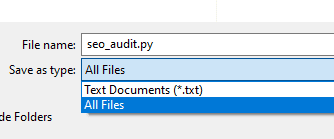
seo_audit.pysomewhere easy to find – your Desktop is fine- Open notepad, paste the script, set the “Save as type” to “All Files” and save the file
- Navigate to that folder within the terminal and run it
The script ran and created a CSV export which you can access here, but here is a screenshot of the results (tweaked here because unformatted spreadsheets are a sin):
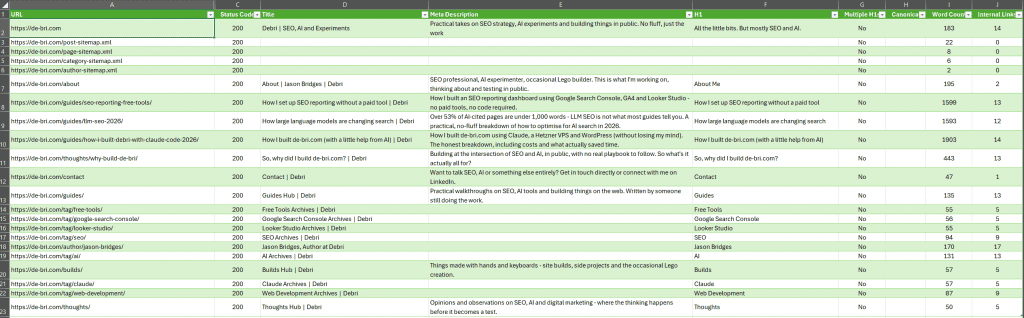
From the crawl I could see:
- 22 URLs were crawled
- No non-200 status codes were found (no errors or redirects)
- No missing or duplicate title tags (added a simple formatting rule in Excel)
- There were missing meta descriptions:
- My author page definitely needed one
- The other pages were WordPress tag URLs that would not be indexable when the site went live – they are purely used for content organisation
- XML sitemap URLs can’t have meta data specified
- No H1 issues (no duplicates, none missing)
- Canonical issues can’t be seen yet as those tags are not generated if a URL is set to not be discoverable
So from a quick review, no obvious issues were found, so I asked Claude to take a look.
How do you feed the crawl data to Claude?
I uploaded the CSV to Claude and asked it to review the findings via a few prompts. I started with:
Here's the full crawl output from de-bri.com. Identify any SEO issues, prioritise them by likely impact, and flag anything that needs to be fixed before launch.The results were expected, covered by some of my feedback from the previous section. Though there were some recommendations that could be utilised in future crawls – for example not including rows for XML sitemap URLs (though if you want to make sure they’re working and returning a 200 status I’d keep them).
What did Claude find?
High priority – fix before launch
Missing canonical tags across the entire site. Every single URL has a blank canonical field. This is the most significant issue in the dataset. Without canonicals, you’re leaving it entirely to Google to decide which version of each URL is authoritative – and on a WordPress site with tag pages, category pages, and archive pages all surfacing similar content, that’s a risk. Add self-referencing canonicals to all pages. Yoast should be handling this automatically – worth checking why it isn’t outputting them.
Sitemap XML files are being crawled as pages. The crawler picked up post-sitemap.xml, page-sitemap.xml, category-sitemap.xml, and author-sitemap.xml as crawlable URLs, all returning 200s with no title, meta description, H1, or content. These aren’t pages – they shouldn’t be in the crawl as content. Not a critical issue but worth noting that your sitemap structure is a Yoast index sitemap splitting into sub-sitemaps, which is standard, but these files should be excluded from any “page” reporting.
Medium priority
Missing meta descriptions on all tag and author pages. The tag pages (free-tools, google-search-console, looker-studio, seo, ai, claude, web-development) and the author page all have no meta description. Google will generate one, but you have no control over what it says. These pages are low priority for content but worth adding basic descriptions to.
Thin word counts on several pages. Contact page is 47 words. Builds hub is 57 words. Tag pages range from 55-94 words. Thoughts hub is 50 words. None of these are likely to rank for anything on their own, but the contact page in particular is worth a note – 47 words is very thin even for a contact page and Google may treat it as low quality.
Homepage word count is 183 words. For a site where the homepage is effectively a content hub, that’s light. It’s not a crisis for a new site but worth being aware of as the site grows.
Low priority / nice to fix
The “why-build-de-bri” post is 443 words. Short for a standalone post, though if the intent is purely a credibility/about piece rather than an organic ranking target that’s fine. Just flagging it.
Tag pages have no meta descriptions. Already noted above but worth a separate callout – if any of these tags ever accumulate enough posts to rank, you’ll want descriptions in place.
No issues found on:
- Status codes – everything is 200, no 404s, no redirects misfiring
- H1s – no pages with multiple H1s, no missing H1s on content pages
- Title tags – all content pages have titles, all follow a consistent format
- Duplicate titles – none detected
What follow-up prompts can you run?
- From here you could create prompts to follow-up for any specific areas, for example:
Title Tags
Looking at the title tags in this crawl data, assess them against SEO best practices. Flag any that are too long, too short, missing the primary keyword, or too similar to each other. Suggest improved versions for any that need work
Meta Descriptions
Review the meta descriptions in this crawl data. Flag any that are missing, too long, too short, or don't accurately reflect the page content. For any that are missing or weak, write a suggested replacement.Internal linking
Using the internal link counts in this crawl data, identify any pages that appear under-linked from the rest of the site. Flag anything with a low incoming link count that should be better supported, and suggest which other pages on the site would be logical places to add a link to it.Working with AI tools to crawl and audit your site is a different experience. Instead of just seeing the data and making your own conclusions, Claude looked through the data, provided context and also told me what to fix prior to launch via a prioritised fix list.
When does this workflow stop being enough?
I love paid crawling tools and even though this isn’t a replacement for a full technical audit, it’s more than good enough for a pre-launch check on a small site.
Where it starts to break down: larger sites with complex redirect chains, JavaScript-heavy sites where content is rendered client-side, or anything that needs custom crawl configuration beyond what the script handles. For those scenarios, the paid Screaming Frog licence starts to justify itself pretty quickly.
If you want to take the Claude approach further without paying for Screaming Frog, the claude-seo.md workflow covers a more advanced setup using Claude Code directly – worth a look if you’re comfortable in the terminal.